
比較
Best AI 3D Model Generators in 2026: Tested Side by Side
すぐわかる答え
For people and figurines, Hunyuan 3D 3.1 was the most faithful. Tripo H3.1 had the richest surface detail but can look metallic. SAM 3D was the surprise at about $0.02 a run. To try it without code, start with a free plan from the tool table below.
始める前に
- Hunyuan 3D 3.1 gave the most faithful faces and poses, and clean everyday objects.
- Tripo H3.1 had the most surface detail, but its PBR materials can make skin and glazes look metallic.
- SAM 3D was strong for about $0.02 a run; TRELLIS failed on a busy outdoor photo.
There is no single best AI 3D model generator. It depends on what is in your picture and what you will do with the model:
- People, pets and figurines: Hunyuan 3D 3.1 kept faces and poses closest to the photo.
- Products and furniture: Tripo H3.1 had the most surface detail and real PBR materials, but check glossy objects and skin for a metallic look.
- Tight budget: SAM 3D did surprisingly well for about two cents a run, as long as the photo has one clear subject.
- Trying it out without code: use a free plan from the table below, or turn one photo into a 3D model with our generator. Your first model is free with Google sign-up.
Which tool to use: apps compared
Most people searching for an AI 3D model generator want an app, not an API. Here is what the main image-to-3D apps offer. We checked each public pricing page on 21 November 2026. These numbers change often, so check before you buy. Our own site is listed last and is not ranked.
| Tool | Free to start | Paid from | Catch on the free plan |
|---|---|---|---|
| Meshy | 100 credits a month | Pro $20/month | Free models are CC BY 4.0 (credit required) |
| Tripo | 200 credits a month (about 13 models) | Pro $20/month billed yearly; packs from $10 | Free models are public and non-commercial |
| 3D AI Studio | Free credits on sign-up (amount not stated) | Basic $12/month billed yearly ($144) | Models kept 6 months on the free plan |
| Sloyd | 1 AI generation a day | Plus $15/month, or $12.50 billed yearly | Personal-use license only |
| trellis2.app | No free tier stated | Starter $19/month for 15 credits | Commercial rights only from Pro ($49/month) |
| 3D Model Maker (ours) | First model free with Google sign-up | Basic $9.90/month; packs from $9.90 | Free capacity is limited at busy times |
All of these export GLB. For printing, look for STL export: 3D AI Studio lists STL and 3MF, and our generator downloads STL, OBJ and GLB at the same price.
How we tested
Most "best AI 3D generator" lists compare marketing pages. We compared outputs. On 20 November 2026 we sent the same 10 images to four image-to-3D models through the same API host (fal.ai):
- Tripo H3.1 (
tripo3d/h3.1/image-to-3d, textures and PBR on) - Hunyuan 3D 3.1 Rapid (
fal-ai/hunyuan-3d/v3.1/rapid/image-to-3d) - TRELLIS v1 (
fal-ai/trellis, 1024 px textures) - SAM 3D Objects (
fal-ai/sam-3/3d-objects, with a one-word prompt such as "chair")
The images covered what people actually upload: three characters (an anime-style warrior, a stylized police officer bust and a real action photo of a football player), three products (a leather bag, a coffee machine on a cluttered counter and a paint-splashed car) and four hard shapes (a llama head, a bouquet of thin petals, a chair with thin legs and a teapot). Inputs were used as they came, between about 500 and 900 pixels wide.
Every result was opened in the same viewer (model-viewer with its neutral studio light) from the same camera angle. We judged shape, the invented back side, texture, faces, thin parts, time, file size and price. Hunyuan Rapid returns an OBJ with a separate texture, which we converted to GLB for viewing.
Side by side: what the models produced
A stylized portrait
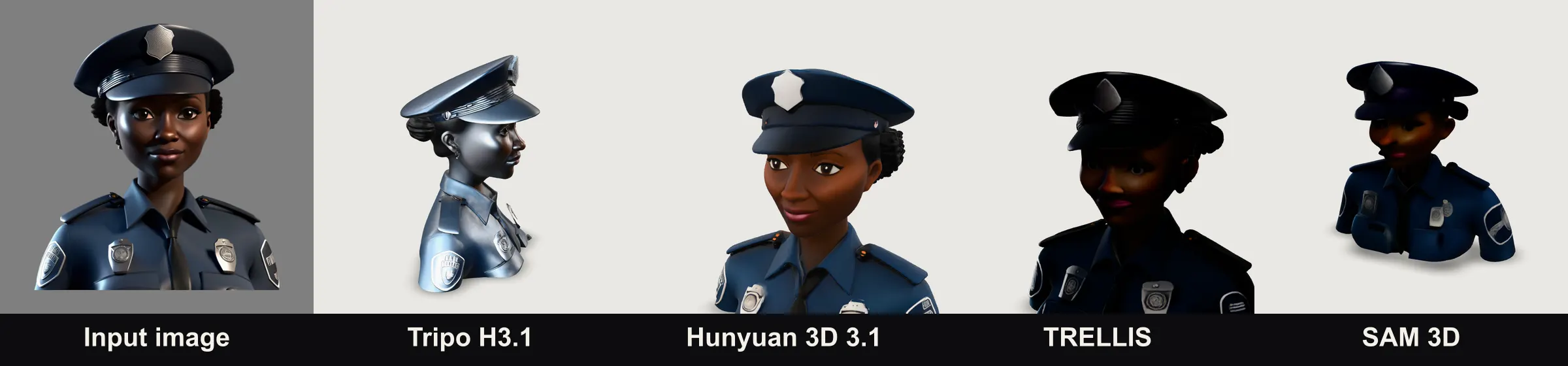
Hunyuan 3D is the only one with a clear, correctly colored face. TRELLIS and SAM 3D turned the face almost black. Tripo got the shape right, but its material reads as metal, so the skin looks like a painted statue.
A product: the teapot
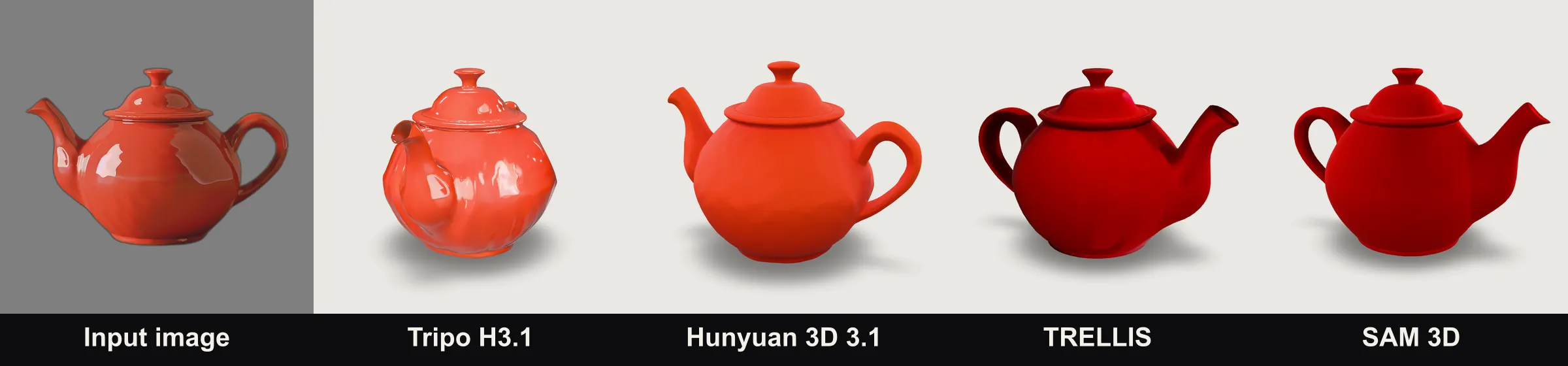
A simple, isolated object is where every model does well. Hunyuan, TRELLIS and SAM 3D gave clean, round bodies. Tripo’s glaze looks the most realistic, but the body came out slightly lumpy.
Thin parts: the chair
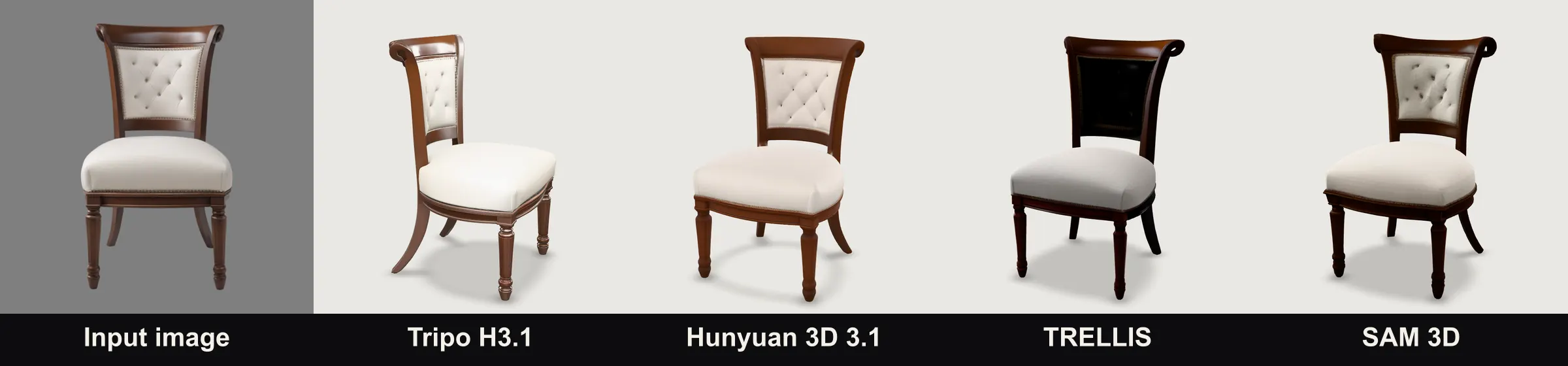
All four kept the thin legs. Tripo, Hunyuan and SAM 3D kept the tufted back cushion; TRELLIS lost it and filled the back in black.
A busy action photo
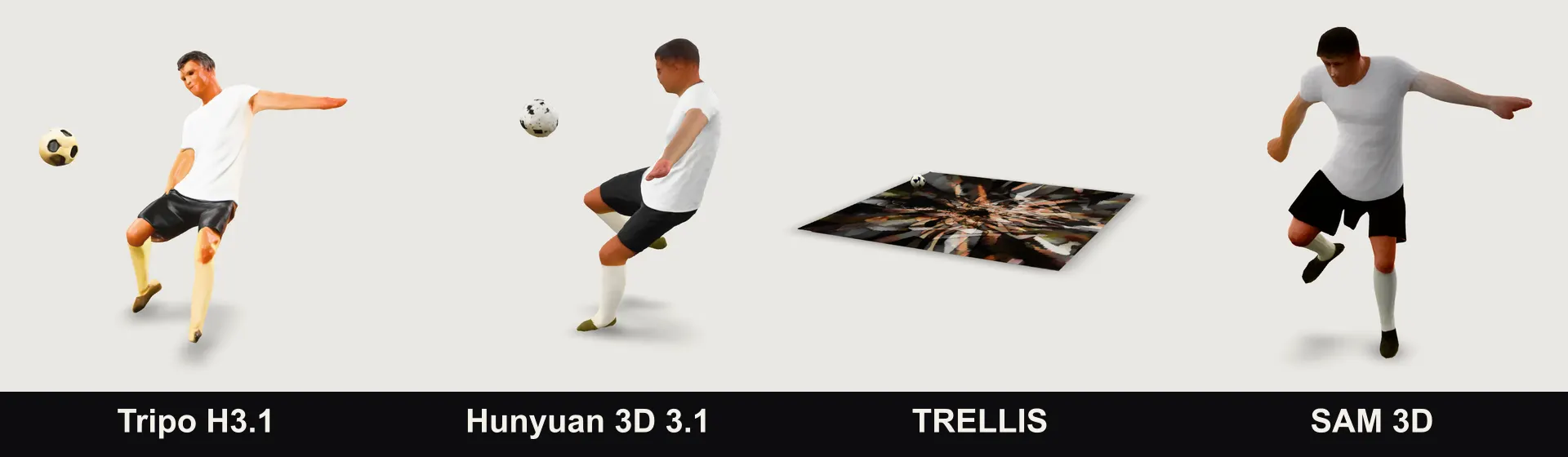
The input here is a real photo of a person, so we show only the results. This is the hardest case: a small figure, a ball in the air and a busy background. Tripo, Hunyuan and SAM 3D all separated the player; Tripo and Hunyuan also kept the ball. TRELLIS did not separate the player from the background and returned a flat, textured slab.
Under the hood: which model wins
| Model | Price per model (API) | Time in our test | Strengths | Weak spots |
|---|---|---|---|---|
| Hunyuan 3D 3.1 Rapid | ~$0.23 | 80–180 s | Most faithful faces and poses; clean everyday objects | OBJ output, max ~950 KB input image |
| Tripo H3.1 | ~$0.30 with textures | 100–200 s | Most surface detail, real PBR materials | Can look metallic; default meshes ~1.4M triangles (~44 MB) |
| SAM 3D Objects | ~$0.02 | 20–40 s | Cheap, separates the subject from busy scenes | Needs a text prompt; dark faces |
| TRELLIS (v1) | ~$0.02 | 20–90 s | Cheap and fast on clean objects | Fails on busy backgrounds; dark faces |
API list prices as of November 2026. Consumer plans on each brand’s own site are priced differently.
Hunyuan 3D 3.1 is the best all-rounder in our test: the most faithful to the input, and the only one that gave a stylized face a clear, natural look. The Rapid version returns an OBJ with a separate texture rather than a GLB, and it rejects images over roughly 950 KB, so inputs need compressing. Use it for characters, figurines and anything with a person in it.
Tripo H3.1 produced the most convincing surfaces on furniture and the action photo, with color, roughness and normal maps that react to light. Two caveats. Its materials can come out too metallic, which is what you see on the portrait. And out of the box a model averaged about 1.4 million triangles and 44 MB, too heavy for a web preview, so set a face limit (for example 150,000 triangles). Use it for products, props and hero assets.
SAM 3D Objects was the surprise. At about two cents a run it separated the football player cleanly and kept the chair’s cushion. It needs a one-word prompt for the object, and faces came out dark. Use it for quick, cheap drafts of a single clear subject.
TRELLIS (v1) did well on clean product shots but failed on the busy photo and lost detail on the chair. Remove the background first, and keep it for simple isolated objects. Its successor, TRELLIS 2, was not part of this test.
Rotate a few results yourself
These are Tripo H3.1 models from the same test, reduced to 60,000 triangles for fast loading. Click one to rotate it.
Chair Leather bag Coffee machine Flowers
Which AI 3D model generator should you use?
- For 3D printing figurines and characters: Hunyuan 3D for faithful shape and pose. To skip the setup, make a 3D figurine from a photo and download the STL.
- For products, e-commerce and AR: Tripo for surface detail, with a face limit for web delivery and a check for metallic-looking materials.
- For games and props: Tripo or Hunyuan; both import into Blender, Unity and Unreal.
- For flat artwork, signs and lithophanes: you do not need AI at all. The free image to STL converter turns a picture into a printable relief.
- For bulk drafts on a tiny budget: SAM 3D, with one clear subject per image.
Our own 3D model maker uses Tripo H3.1 with a mesh limit tuned for fast browser previews, so you get its surface detail without a 44 MB download.
Why not just use the API yourself?
The API prices above are lower than what apps charge. Tripo with textures costs about $0.30 a model through the API. On our pricing page, a model works out to $0.60–$0.83 depending on the plan. Here is what the difference pays for:
- No code and no API key. Upload a photo in the browser; no scripts, no polling for results, no billing account with an API host.
- Every format in one click. Each model downloads as GLB, STL or OBJ and appears in your history; the API returns one format and you convert the rest yourself.
- A viewer and print checks. Every model opens in a 3D viewer, and the STL can be checked for watertightness and volume before you print.
- Failed generations are refunded. Through an API you pay for every run, good or bad.
If you can write code and plan to generate hundreds of models, the API is the cheaper choice. That is how we ran this test. For a handful of models, an app saves you the setup.
Tips that improve every generator
- One subject, fully in frame. Cropped feet or hands become guesses.
- Plain background. It removes the biggest single source of errors we saw.
- Even light, no motion blur. Shadows are easily mistaken for shape.
- Front or three-quarter view. The model has to invent less of the back.
There is more on choosing and preparing photos in our guide to making a 3D model from an image.
Check any result before you use it
Open the model in a 3D file viewer, rotate it fully and toggle the wireframe. For printing, open the export in the STL viewer: it shows the size, whether the mesh is watertight and its volume. Check wall thickness in your slicer. AI models are fast first drafts, and a few minutes of review saves a failed print. All our free viewers and converters are on the tools page.
Frequently asked questions
What is the best free AI 3D model generator?
For a free start, Tripo gives 200 credits a month (about 13 models) and Meshy gives 100 credits a month, but free-plan models are public or need attribution. 3D Model Maker gives your first model free when you sign up with Google. Prices and allowances were checked on 21 November 2026 and change often.
Which open-source image-to-3D model is best?
Of the open models we tested, SAM 3D Objects was the more reliable: it handled the chair and the football photo well. TRELLIS (v1) was fine on clean product shots but turned a busy photo into a flat slab. Both rendered faces too dark.
Can I run TRELLIS or SAM 3D for free on Hugging Face?
Both have open weights and public demos, so you can try them for free or run them on your own GPU. Hosted APIs charge about $0.02 per run. Expect to remove the background yourself for best results.
Which AI 3D generator is best for 3D printing?
For figurines and characters, Hunyuan 3D 3.1 kept poses and faces closest to the photo. Whatever you use, export an STL, check it is watertight and check wall thickness in your slicer before printing.
Which AI 3D generator is best for faces?
Hunyuan 3D 3.1, clearly, in our test. TRELLIS and SAM 3D produced very dark faces, and Tripo’s materials made skin look like painted metal under studio light.
Should I use an API instead of an app?
If you can write code and generate hundreds of models, an API is cheaper per model. If you want a few models without handling API keys, storage, file conversion and a viewer, an app is faster. The section on APIs below compares the costs.
Can I use AI-generated 3D models commercially?
It depends on the tool and plan. Tripo free-plan models are public and non-commercial, Meshy free-plan models are CC BY 4.0, and Sloyd’s free plan is personal use only. Paid plans usually allow commercial use. 3D Model Maker allows commercial use on every plan, as long as you have the rights to the input image.
What is the newest AI 3D model generator in 2026?
At the time of writing (November 2026), Tripo H3.1, Hunyuan 3D 3.1, TRELLIS 2 and SAM 3D Objects are the current generations. We tested TRELLIS v1; TRELLIS 2 is offered by third-party sites such as trellis2.app.
Input images for the portrait, teapot and chair come from the TripoSR examples (MIT license).